The client is a global automobile manufacturer with a presence across major markets worldwide. With a portfolio spanning light-, medium-, and heavy-duty vehicles, as well as city and intercity buses, trucks, coaches, and bus chassis, the company serves customers with a wide range of transportation needs. Operating across multiple regions, they serve logistics and passenger transport customers reliant on commercial vehicles.
Client
The client is a global automobile manufacturer with a presence across major markets worldwide. With a portfolio spanning light-, medium-, and heavy-duty vehicles, as well as city and intercity buses, trucks, coaches, and bus chassis, the company serves customers with a wide range of transportation needs. Operating across multiple regions, they serve logistics and passenger transport customers reliant on commercial vehicles.
Challenges Faced by the Client
The client organization had a structured workplace environment in which different departments regularly get visitors for meetings, business engagements, recruitment drives, audits, and other scheduled activities. As the volume of visitors increased, the process became more difficult to manage efficiently due to:
- Visitor information being kept in manual records: All visitor details were recorded across Excel and paper-based records at different stages of the process. As a result, the team had to manually refer to these records to manage visitor information throughout the visit.
- Manual check-in processes increased visitor waiting time: When visitors arrived, the front office team had to complete the registration and check-in process manually before they could proceed with their visit. This increased the wait time of visitors at reception, particularly when several visitors arrived at the same time.
- Limited visibility into visitor status: The respective department/team needed to know whether a planned visitor had arrived, was still expected, or had not arrived by the scheduled time. Without a common view of these statuses, tracking the progress of each visit depended on information being updated and checked at different stages.
Solutions
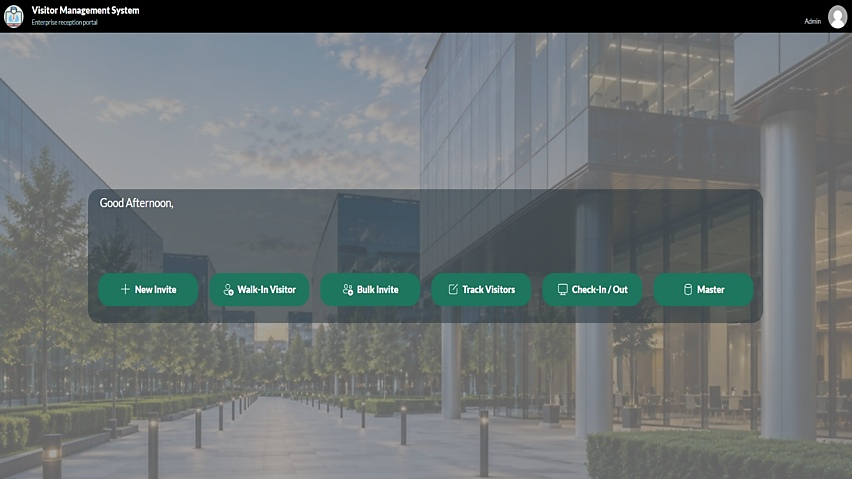
The client needed a digital process to efficiently manage visitor registrations, check-ins, verification, record maintenance, and related activities, while keeping access aligned with each user’s responsibilities. Understanding their existing workflows, our technical specialists at UBTI designed a Visitor Management System (VMS) that consolidates all these activities related into a single application and provides each user with the functions relevant to their role. The solution was built using Microsoft Power Apps (Canvas App), with Dataverse used to store and manage visitor and visit information, and Power Automate to send email notifications for stakeholders with these features:
- Role-based access controls for each user: The application supports administrators, employees (i.e., hosts), and receptionists, with each role having access to the functions required for its job responsibilities, namely:
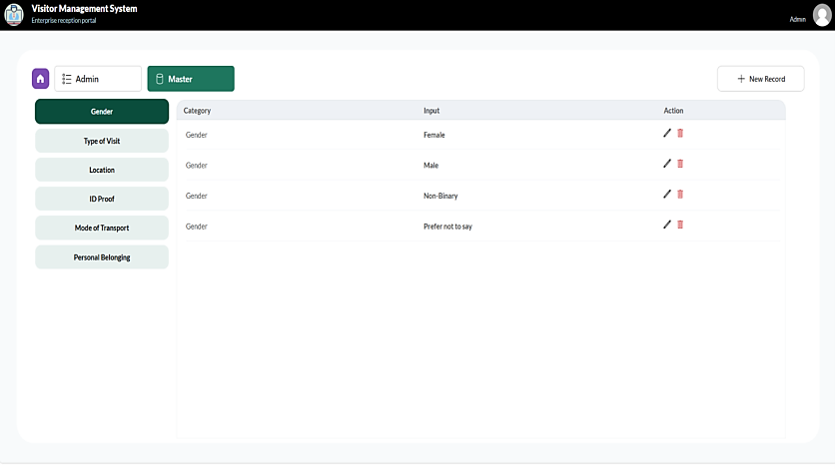
- Admins: Manage the application’s master controls, including visit types, locations, ID proof options, personal belongings, and modes of transportation. They also manage access controls within the application.
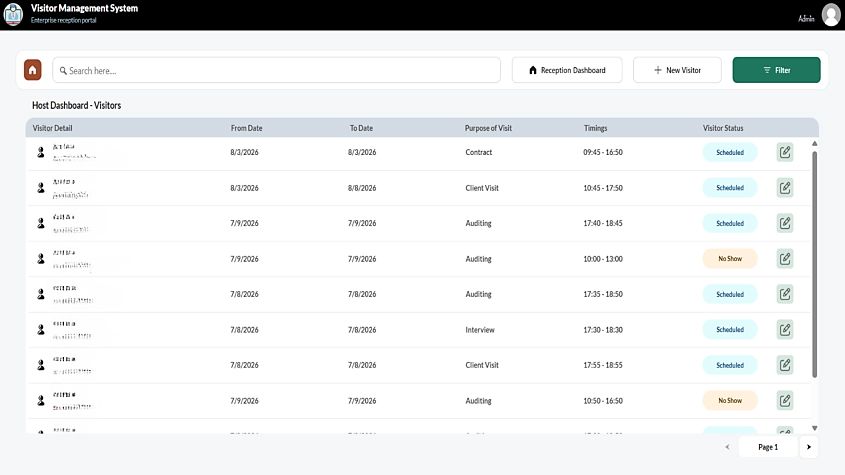
- Hosts: Create and manage planned visitor appointments, enter visitor details in advance, and manage visits for the people they are expecting.
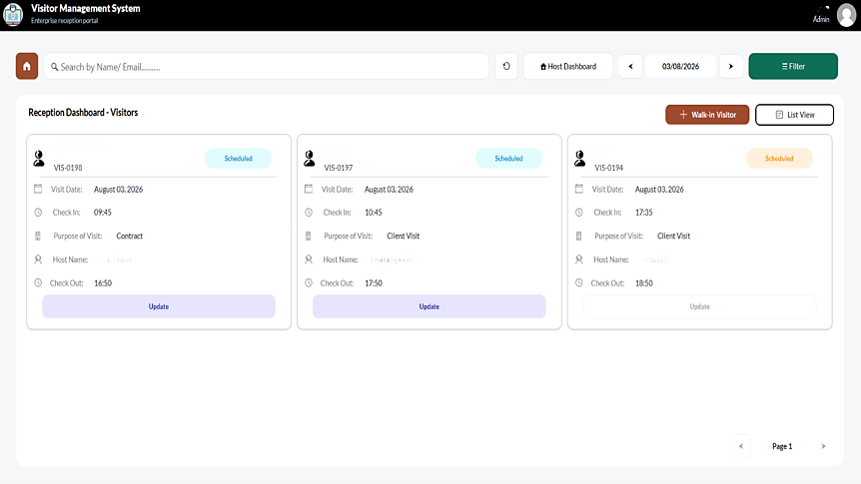
- Receptionists: Register walk-in visitors, access scheduled visits when visitors arrive, and manage visitor check-in & check-out.
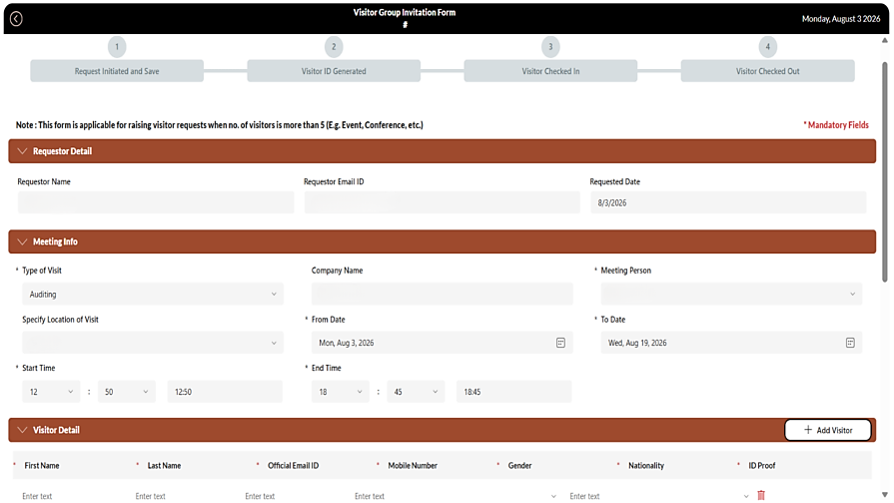
- Planned and scheduled visit management: For a planned visit, the host enters the visitor’s details and schedules the visit for a specific date. The visitor’s ID proof is mandatory, and details such as nationality and other visit information can be selected from a dropdown. Once the visit is scheduled, an email is auto-triggered to the relevant stakeholders.
- Planned and walk-in visitor registration: When a planned visitor arrives, the receptionist can find the scheduled visit and complete the check-in based on the set date and time. For walk-in visitors, the receptionist enters the visitor’s details directly into the application and completes the check-in process after the required ID proof is provided.
- Automated check-in and visit status management: For planned visits, the check-in option becomes available only on the scheduled date and is enabled when the scheduled time is reached. If the visitor does not check in after the scheduled time has passed, the visit is automatically marked as a no-show, keeping the visit status up to date in the application.
- Multiple visitor registration for group visits: When several visitors are attending the same visit, the host can use the ‘Add Visitor’ option to enter each person’s details in one go. Each visitor is then maintained as an individual record in the ‘track visitors’ section, allowing them to be checked in separately upon arrival.
- Automated email notifications and reminders: Microsoft Power Automate sends email notifications when a new visit is scheduled and reminders on the date of arrival. Admins are included in all email communications.

Solutions Benefits
UBTI’s visitor management system moved the client’s paper- and Excel-based recordkeeping to a consistent digital process. This has made visitor handling more consistent from registration through check-out as:
- Visitor management is now fully digital: The client has moved away from maintaining visitor information through paper records and Excel. Visitor details, visit schedules, and check-in activity can now be managed through a single, consistent digital process, reducing the need for manual record-keeping.
- Front office can handle arrivals with less waiting: Visitors no longer need to go through the same level of manual registration for every arrival, as planned visits can be identified from the information already recorded. This helps reception process visitors more smoothly and reduces the time visitors spend waiting to complete their entry.
- Teams have clearer visibility of every visit: Hosts, reception teams, and administrators can see the visitor activity relevant to their responsibilities, while planned visits can be tracked through their status. This makes it easier for the respective teams to know which visitors have arrived and which scheduled visits did not take place.
- Group visits become easier to coordinate: Multiple visitors linked to the same visit can be handled individually, which is useful for audits, recruitment drives, and events where a group of people arrives for a common purpose.
Conclusion
Managing visitors using paper records and Excel made it difficult for the client to maintain a consistent, controlled process across the organization. This created more manual work for the teams handling visitor registration and check-in, while making it harder to maintain clear visibility of visitor activity and status. Our Microsoft-certified experts at UBTI addressed this by building a digital Visitor Management System using Power Apps, with Dataverse supporting visitor & visit information, and Power Automate handling key notifications. The resulting process brings visitor registration, scheduling, check-in, check-out, and status tracking into a single, consistent workflow, providing the organization with a more standardized way to manage visitors across departments. UB Technology Innovations, Inc. continues to help vehicle manufacturers bring everyday manual processes into simpler digital workflows, starting with what their teams need to get the job done.